

QC Item Status
Each version of a QC Item has one status. A new version normally moves through five steps, from an idea to an officially published test. Each step has one purpose, a minimum time and a group of people who can contribute.
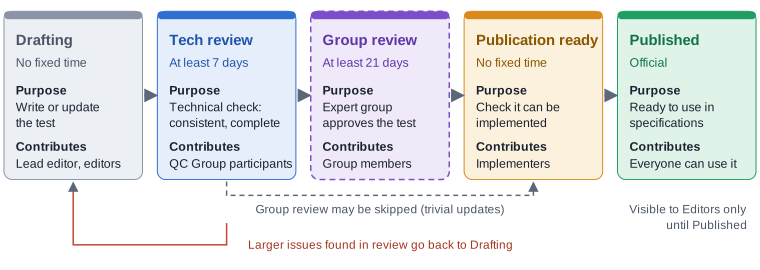
The steps at a glance
| Status | Purpose | Who contributes | Minimum time | Visible to |
|---|---|---|---|---|
| Drafting | Write or update the test: an idea, a proposal or work in progress | The lead editor and other editors | None | Editors |
| Tech review | A technical check of consistency and completeness | EBU QC Group participants | 7 days | Editors |
| Group review | The relevant EBU expert group approves the test | Members of that group, who raise discussion items | 21 days | Editors |
| Publication ready | Check that the test can be implemented | Implementers (e.g. vendors) | None | Editors |
| Published | The official version, ready to use in specifications | Everyone can read and use it | None | Everyone |
How long does it take?

Tech review and Group review are minimum periods. They start when the Item enters that status. Later edits do not restart them; only moving the Item into the status again from another status does. Each period ends at 23:59 UTC on the deadline date, so a 7 day period lasts 7 to 8 days and a 21 day period lasts 21 to 22 days. The Cards in views showing collections of Items show a coloured bar and a days left or days passed indicator, together with the end of the period (for example '21 Oct 2026, 23:59 UTC').
From the start of Tech review, a standard Item needs at least four weeks before it can be published. A trivial update that skips Group review needs one week plus the Implementer confirmation.
The steps in detail
Drafting
It is an idea, proposal or still being worked on. It has no fixed duration. The lead editor and other editors write and edit the Item.
When a published Item is edited, the new version defaults to Drafting.
Versions of QC Items with this status are only visible to Editors.
(QC Group) Tech review
For a QC Item with this status, the drafting process is believed to have finished. A 'technical' check is ongoing. The EBU QC Group participants have at least 1 week (7 full days, in practice 5 working days) to check the consistency of the QC Item, check for any lacking data, etc. Small issues are corrected directly; larger issues are brought back to the Test editor for resolution.
When the Test passes Tech Review and the update is not trivial, it goes to the relevant EBU (Expert) Group for review. For trivial updates, the Group Review may be skipped, and the lead editor of the Item can move it straight to Publication ready.
Versions of QC Items with this status are only visible to Editors.
(Note that in the past the Tech Review work was performed by a special QC Output Subgroup after the QC Group review.)
(Expert) Group review
The QC Item is reviewed by the relevant EBU group for approval (e.g. the Audio Group). This group has at least 3 weeks (21 full days) to review the Test and raise any issues by opening discussion items. If, after the 3 weeks have passed, no more discussion items are open related to this version of the Test, it should go to Publication ready.
Versions of QC Items with this status are only visible to Editors.
Publication ready
The QC Item is ready to be published.
A Publication ready Item waits for implementability confirmation 🧪 (experimental): Implementers (e.g. QC vendors) confirm that the test can be implemented. When two different companies have confirmed, the Item is published automatically. A workflow manager can still publish it by hand. See Implementability confirmation. There is no fixed time for this step.
Versions of QC Items with this status are only visible to Editors.
Published
The QC Item is officially published. Versions of QC Items with this status are visible to all.
Editing a Published Item creates a new version in Drafting. The Published version stays visible until the new version is published.
Other statuses
Back to Drafting
Review is a loop, not a one way street. If a reviewer finds a larger problem, the Item goes back to Drafting so the editor can resolve it, and then it enters review again.
Contentious
The QC Item may be withdrawn in the (near) future. This version of a QC Item is only visible to Editors.
Withdrawn
A QC Item with this status signals the Item should not be used in new specifications/work. Note that published prior versions will still be available, as they may still be in use.
- A version can only be changed to Withdrawn if it is currently Published, and only workflow managers can do it.
- Changing the status from Published to Withdrawn creates a new version, so the version number increases.
- An Item Definition must not be edited once its latest version is Withdrawn.
- Withdrawn applies to the Item Definition as a whole, not to one version. When the latest version is Withdrawn, no version of that Item should be used in new specifications/work.
Who can change the status
The status of a version is changed in the Item's edit form. The statuses you are offered depend on your role and on the current status.
| Role | From Drafting | From Tech review | From Group review |
|---|---|---|---|
| Workflow manager | any status | any status | any status |
| Lead editor of the Item | Tech review | Group review, Publication ready or Drafting | Publication ready, Tech review or Drafting |
| Other editors | stays in Drafting | no change | no change |
| Everyone else | no change | no change | no change |
An Item normally follows this path: Drafting, then Tech review, then Group review (if relevant; it may be skipped for trivial updates), then Publication ready. Only workflow managers can go from Drafting directly to Group review. The lead editor of the Item can move it to Publication ready from Tech review or Group review, as long as the Item checks show no blocking (red) finding. Workflow managers are always notified by e-mail when an Item reaches Publication ready. Once an Item is Publication ready, Contentious or Withdrawn, only workflow managers can change its status. A Published version can only be followed by a new Drafting version (or, by a workflow manager, a Withdrawn one).
If you cannot move an Item into review, check that you are its lead editor (shown on the Item) or ask a workflow manager.
Item checks must be clear first
An Item cannot move to Tech review, Group review, Publication ready or Published while its Item checks show a blocking finding, for example a CheckResult definition that still starts with "[TO BE VERIFIED]". Some blocking findings, such as an empty Name or EBU QC ID, stop every save, also in Drafting. The Item check rules page lists which is which.